
Starter
$4.99
Try five Halloween costume looks.
YOUR HALLOWEEN ALTER EGO
One photo. A whole new Halloween look. Choose a style and make it yours.
Use a clear, well-lit portrait. For Halloween decor, upload a room photo.
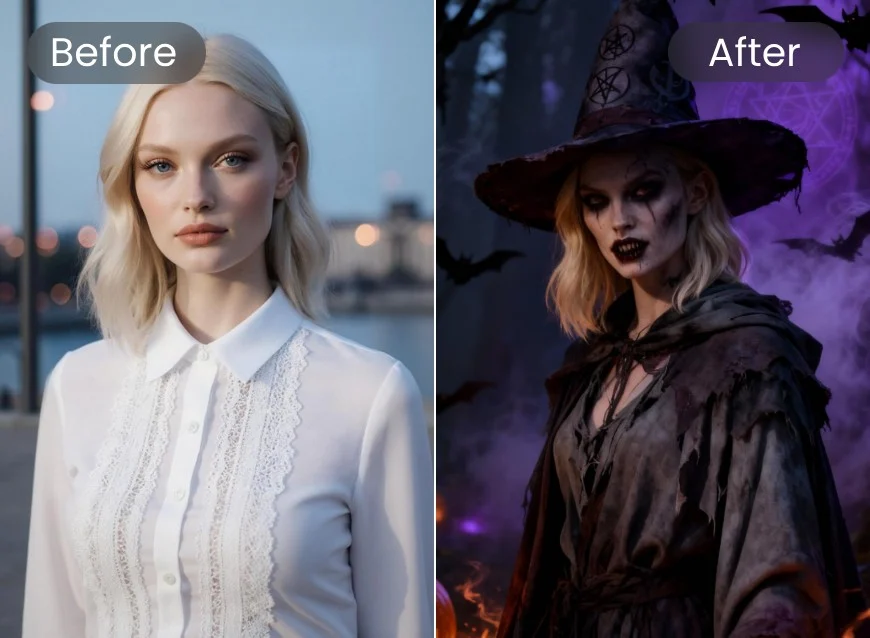 Selected styleEvil WitchExplore all 12 styles
10 credits required per photo
Checking for an unfinished photo…
No sign-up required · One-time payment
PICK YOUR SPOOKY SIDE
Turn an everyday photo into a Halloween moment. Explore eerie makeup, dramatic costumes, and atmospheric backgrounds — no editing skills needed.
Click an image to choose your lookAn AI Halloween photo combines your portrait with a costume, spooky setting or cinematic lighting. Explore 12 example styles, from witches and vampires to skeletons, and find a look for your next Halloween picture.
A photo tool that shows you in a costume you are not wearing yet. Try a costume idea, plan a couple or group theme, or make a Halloween picture to share.
JPG, PNG or WebP up to 10 MB. Pick a clear photo where the face is visible.
Choose a look from the 12 Halloween styles below the generator.
Keep your makeup or add costume face paint.
Compare Halloween costume ideas before October 31.
One-time credit packs for Halloween costume photos. No subscription. Compare the packs below.
$4.99
Try five Halloween costume looks.
$12.99
Explore more styles for your Halloween photo.
$22.99
Create photos for friends and family.
No sign-up required. Enter your email at Stripe checkout, then recover orders anytime with a secure email link.
An AI Halloween photo generator edits a photo into a Halloween portrait by changing costumes, scenery or lighting. A costume try-on focuses on your outfit; a Halloween photo editor can also create a spooky scene.
Start with a clear photo, choose a costume or scene, and describe what should change and what should stay the same. This page lets you preview your photo and browse 12 styles; generation and checkout are not connected yet.
You can try the prompts below in an image-editing tool with a free allowance. Availability and usage limits depend on the tool. Browsing the styles and previewing your upload here are free.
Name the costume, describe the setting and lighting, then specify the face, expression and pose to preserve. For example: “Keep my face and makeup; add a black vampire cape and match the original lighting.”
Use a mode that accepts an uploaded image and returns an edited image. Upload your photo, paste a prompt, and request corrections one at a time. Image-editing availability and limits depend on your account and the tool.
The trend turns everyday selfies into spooky portraits, costume try-ons and cinematic Halloween scenes. Try a gothic vampire, a witch portrait or a foggy pumpkin patch. The prompts below give you a starting point.
Use a sharp, evenly lit photo and explicitly ask the editor to preserve your facial features, expression and makeup. Avoid face-paint instructions if you want your original makeup. Compare the result with your original photo; AI can still alter faces.
Choose a JPG, PNG or WebP up to 10 MB with your face clearly visible. A waist-up or full-body photo gives a costume editor more of the outfit to work with. Avoid heavy blur, face-covering accessories and strong beauty filters.
The current preview uses a local browser object URL: choosing a photo does not upload it to an image provider. If you use a prompt in another AI tool, that tool handles your photo under its own privacy policy. Only use photos you have permission to edit.
Try a vampire cape, witch outfit, skeleton costume, pirate look or dark fantasy portrait. Describe the clothing, mood and lighting you want rather than relying on gender labels. Use the gallery to compare the 12 example styles.
The displayed packs are Try at $0.99 for 2 photos, Trick at $4.99 for 10, Treat at $9.99 for 30, and Monster Bash at $19.99 for 80. They are one-time pack prices.